Floral Easter Eggs: A Versatile Digital Design for Crafters
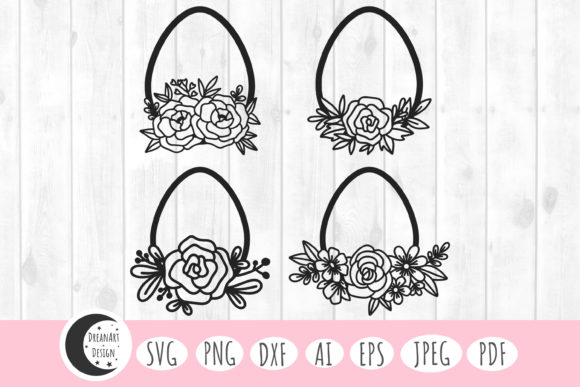
Imagine a collection of beautifully intricate Easter egg patterns, where delicate blossoms, swirling vines, and elegant leaves replace the simple stripes and dots of traditional decoration. This is the essence of Easter Egg Designs Floral Easter Eggs, a digital art pack designed to elevate your seasonal projects and beyond. Unlike physical paints or stickers, this set provides you with vector and image files you can manipulate, resize, and apply to countless surfaces with precision. For anyone working with cutting machines like Cricut or Silhouette, or involved in graphic design, scrapbooking, or product creation, such a bundle is a powerful tool. The immediate appeal is its versatility—the same floral motif can become a vinyl decal on a t-shirt, a delicate element on a greeting card, or a large-scale wall art print.
Overlooking File Format Compatibility: A Common Pitfall
Many crafters, especially beginners, excitedly download a digital design bundle and immediately head to their software, only to encounter frustrating error messages. A key detail often missed is that not all file formats work with all programs. The Easter Egg Designs Floral Easter Eggs bundle includes multiple formats—SVG, PNG, AI, EPS, DXF, JPEG, and PDF—for a very specific reason. Using a JPEG file in Cricut Design Space for a cutting project, for instance, will result in a rasterized image that cannot be cleanly separated into layers for cutting different colors. The machine will treat it as a single block, which defeats the purpose of intricate floral designs meant for layered vinyl application.
A better approach is to understand your primary use case before you even open the files. For machine cutting, the SVG or DXF files are your go-to choices. For graphic editing in professional software like Adobe Illustrator, the AI or EPS vectors allow infinite scaling and element manipulation. The high-resolution PNGs with transparent backgrounds are perfect for digital composites, like adding designs to mock-ups for your online store. Always match the file to the task. Check your software’s documentation to confirm which formats it imports natively, as this small step prevents wasted time and preserves the design’s quality.
The Mistake of Assuming "One-Size-Fits-All" Scaling
Another frequent misunderstanding revolves around scaling digital designs. Because these are vector-based (in the SVG, AI, EPS formats), you can technically resize them infinitely without loss of detail. This is a fantastic feature, but it leads some creators to apply the same design at wildly different scales without adjusting other elements. For example, using a highly intricate floral Easter egg design intended for a 3-inch scrapbook tag at a 30-inch wall decal size might reveal unexpected issues. At a large scale, extremely fine lines in the illustration could become fragile when cut from vinyl or too dominant when printed.
Practical advice here is to always preview your design at the final output size within your software. Zoom in to check line thickness and the spacing between elements. For large-scale applications like wall decor, consider simplifying the design slightly if needed—most vector formats allow you to edit individual paths. Conversely, when shrinking a design for a jewelry pendant or a small card detail, ensure the details don’t become so tiny they vanish. Proactive scaling assessment ensures your final product looks intentional and professional.
Ignoring the Commercial License Implications
Many hobbyists purchase digital designs like these floral Easter eggs for personal projects, but entrepreneurs and small business owners often overlook the critical step of verifying the commercial license. While many design bundles include a license for limited commercial use, it’s not universal. Using a design on products you sell without explicit permission can lead to legal complications.
Before integrating Easter Egg Designs Floral Easter Eggs into your product line—whether it’s printed cards, customized apparel, or digital wall art for sale—review the license terms included with your purchase. Typically, bundles like this one grant personal and commercial use, but it’s your responsibility to confirm. This due diligence protects your business and respects the designer’s intellectual property. It’s a simple check that fosters a sustainable creative ecosystem.
Underestimating the Power of File Organization
Upon downloading a pack with 28 files (4 each of SVG, PNG, AI, EPS, DXF, JPEG, PDF), the immediate reaction might be to dump them all into a general "Easter" folder on your computer. This leads to future frustration when you need the specific PNG file with transparency and spend minutes searching through similarly named files. Poor file management erodes efficiency, especially when you're working on multiple projects or under time constraints.
A corrective and efficient strategy is to organize the files immediately after download. Create a main folder named “Floral Easter Eggs” and then subfolders by format (“SVG Files,” “PNG Files,” etc.). Alternatively, organize by intended use (“Cutting Files,” “Printing Files,” “Editing Files”). This simple system saves significant time later and ensures you always use the optimal format for your project, maintaining quality and workflow smoothness.
The Oversimplification of Print Preparation
When moving from cutting machines to print applications like invitations or art prints, crafters sometimes use the JPEG files straight from the bundle. While convenient, this can compromise quality. The bundled JPEGs are excellent, but for high-end printing, especially on professional equipment, the vector files (EPS, AI) or even the PDFs often provide superior control over color profiling and sharpness.
For the best printed results, particularly if you are a blogger creating digital printables or a freelancer preparing client work, open the vector file in your graphic software. Here, you can ensure colors are set to CMYK if needed for physical printing, adjust bleed areas, and confirm the resolution is optimized for your printer’s DPI capabilities. This extra step, bypassing the ready-made JPEG, elevates the final product from "homemade" to "professionally produced," enhancing satisfaction for both you and your end audience.
Making an Informed Decision Before Purchase
Before finalizing your decision on a digital design set like Easter Egg Designs Floral Easter Eggs, pause to evaluate your actual needs. Are you primarily a Cricut user? Then confirm SVG compatibility is included. Do you need to edit the colors of the floral patterns? Then vector formats (AI, EPS) are essential. Are you planning to use these across different software platforms over time? The multi-format inclusion is then a major benefit.
Also, consider the design’s aesthetic alignment with your typical projects. Floral motifs are timeless, but assess if the specific style—perhaps its line weight or floral density—matches the look you want to achieve on clothes, cards, or decor. Look at example projects (often provided by the designer) to visualize application. This thoughtful pre-purchase assessment ensures the bundle becomes a long-term asset in your creative toolkit, rather than an unused digital download. By focusing on compatibility, application, and licensing, you transform a beautiful set of floral Easter eggs from a simple purchase into a versatile foundation for countless successful creations.